
Loyalty programs are a powerful way to boost customer retention and increase profits. Research shows that improving customer retention by just 5% can lead to a 25% to 95% profit increase. Magento provides tools to create and manage loyalty programs, whether you’re using Adobe Commerce or Magento Open Source.
Key Steps to Get Started:
- Prepare Your Magento Store:
- Create a meed Account:
- Register at
portal.meedloyalty.comto access loyalty program tools. - Start with the free tier for up to 50 members or upgrade for advanced features.
- Register at
- Plan Your Loyalty Program:
- Define goals like reducing churn or increasing order value.
- Set simple earning rules (e.g., 1 point per $1 spent) and redemption rules (e.g., 100 points = $10 discount).
- Add tiers (e.g., Bronze, Silver, Gold) to motivate higher spending.
- Install the meed Magento Module:
- Use Composer to install and activate the module.
- Configure settings like earning events, point expiration, and notifications.
- Test and Launch:
- Test all features in a staging environment.
- Monitor performance metrics like repeat purchase rate and redemption rate.
- Promote your program through emails, banners, and a dedicated loyalty page.
Benefits of Loyalty Programs:
- Encourage repeat purchases with rewards.
- Increase customer lifetime value.
- Compete effectively with larger businesses.
This guide walks you through every step, from setup to launch, ensuring your loyalty program runs smoothly and delivers results.
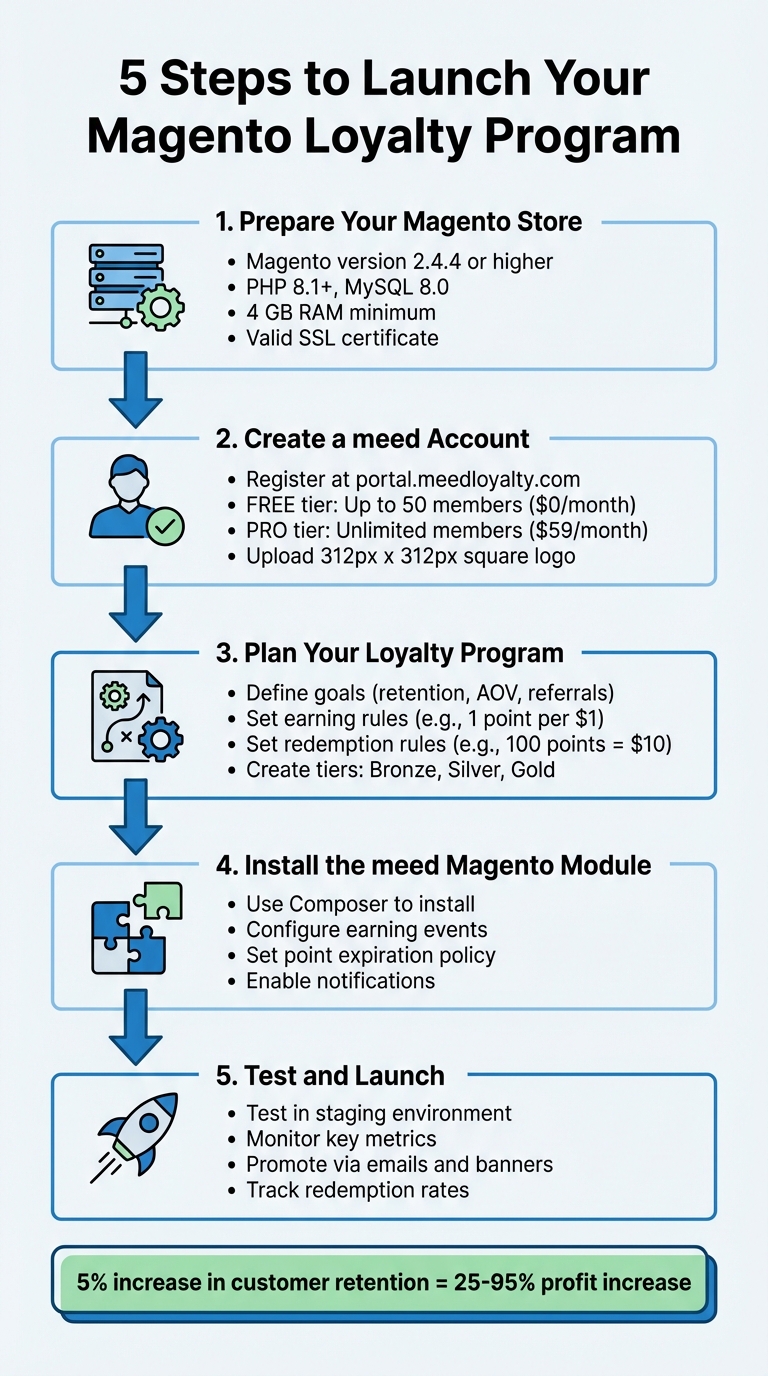
5-Step Magento Loyalty Program Setup Process
Magento 2 Commerce Rewards Points
sbb-itb-94e1183
What You Need Before Starting
Before setting up a loyalty program for your Magento store, it’s crucial to ensure your Magento environment is properly configured and your meed account is ready. This groundwork will help you avoid technical hiccups and streamline the integration process.
Magento Version and Store Setup
To support loyalty program integrations, your Magento store must be running version 2.4.4 or higher. As of January 2026, the most stable versions are Magento 2.4.4 through 2.4.8-p3. You can check your Magento version by logging into the Admin dashboard – look for the version number in the footer’s bottom-right corner.
Your server should meet the following requirements:
- PHP: Versions 8.1 through 8.3
- Database: MySQL 8.0 or MariaDB 10.6
- RAM: A minimum of 2 GB, though 4–8 GB is recommended for smooth performance. If your system has less than 2 GB, configure a swap file to prevent crashes during module installation.
Additionally, you’ll need administrative access to the Magento back office to install modules and adjust settings under Stores > Configuration. Make sure your Magento REST API is accessible at <your-store.com>/rest/V1 for integration purposes, and confirm that your store uses a valid SSL certificate (not self-signed) to securely handle customer data over HTTPS. This security is vital when rethinking loyalty programmes to prioritize privacy and data efficacy.
| Component | Minimum Requirement | Recommended for Loyalty |
|---|---|---|
| Magento Version | 2.4.4 | 2.4.6 or higher |
| PHP | 8.1 | 8.2 or 8.3 |
| MySQL | 8.0 | 8.0 |
| RAM | 2 GB | 4 GB – 8 GB |
| Storage | 120 GB SSD | 240 GB+ SSD |
Creating Your meed Account
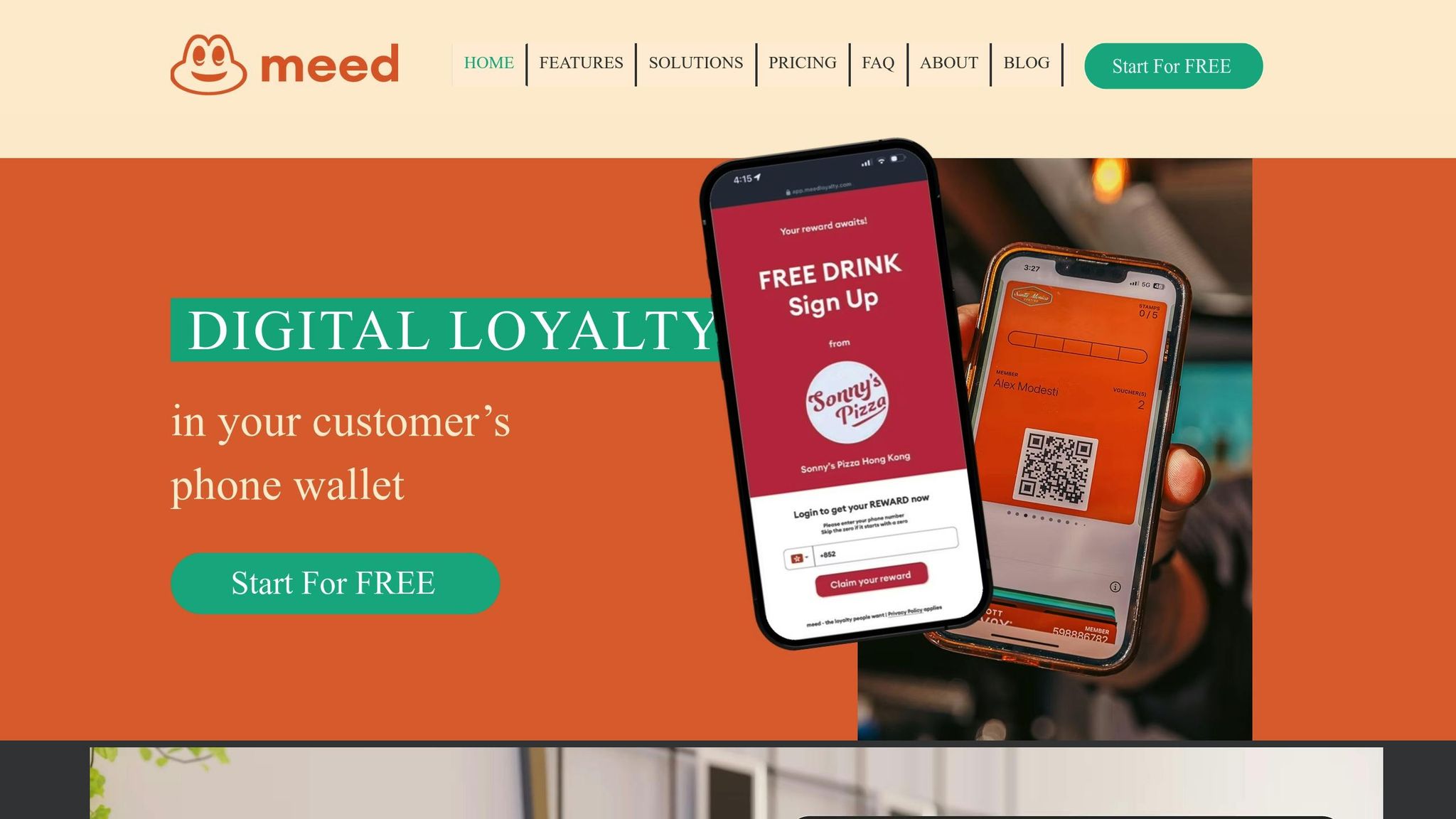
Head over to portal.meedloyalty.com and register using your business email. After verifying your email with an OTP, fill in your name, organization name (used for billing on paid plans), and create a secure password.
Once registered, log in to the meed Business Portal to set up your loyalty program. You’ll need to provide a program name, select your industry, and enter your business location details. Be sure to have a square logo (at least 312px x 312px) ready for upload. If your logo is horizontal, add white space to create a 1:1 aspect ratio.
You can start with the meed FREE tier ($0/month), which supports up to 50 members – perfect for testing the waters. As your program expands, consider upgrading to the PRO tier ($59/month or $590/year) for unlimited members and access to a comprehensive analytics dashboard. After completing your account setup, generate API keys in the meed portal. These keys will link the meed Magento module to your store.
With your Magento store and meed account prepared, you’re ready to start designing the structure of your loyalty program.
Planning Your Loyalty Program Structure
Before diving into the technical setup of your loyalty program, take a step back and define your goals. What’s your primary focus? Are you aiming to reduce customer churn, increase average order value (AOV), or turn your customers into enthusiastic brand advocates through referrals? Knowing your objectives will guide the rest of your decisions.
Setting Goals and Metrics
Start with specific, measurable targets. For example, if you want to improve customer retention, keep an eye on metrics like repeat purchase rate and churn rate. If revenue growth is your aim, focus on tracking AOV and revenue per user. Setting a goal like “increase repeat purchases by 15% within six months” gives you something concrete to work toward.
Tie every metric back to a larger business objective. Want to grow your email list? Offer bonus points for newsletter signups. Need to move excess inventory? Use point multipliers to encourage purchases of overstocked items. Keep an eye on point redemption and participation rates – if redemption rates are low, it might mean your rewards aren’t enticing enough or that customers find it too hard to earn points.
| Goal | Metric/KPI to Track |
|---|---|
| Customer Retention | Repeat Purchase Rate, Churn Rate |
| Spending Growth | Average Order Value (AOV), Revenue per User |
| Program Health | Point Redemption Rate, Participation Rate |
| Brand Advocacy | Referral Conversion Rate, Social Shares |
| Engagement | Review Submission Volume, Newsletter Signup Rate |
Once your goals are in place, create straightforward earning and redemption rules that align with them.
Building Point Earning and Redemption Rules
Keep your earning and redemption rules simple. For instance, awarding 1 point for every $1 spent and allowing 100 points to be redeemed for a $10 discount is easy for customers to grasp. Since 60% of shoppers expect to earn points when they make a purchase, make sure your earning structure feels rewarding enough to drive action without cutting too deeply into your margins.
Introduce a minimum redemption threshold – say, between 100 and 500 points – to encourage repeat purchases before customers cash in their rewards. You can also incentivize non-purchase actions, like awarding 25 points for product reviews, 50 points for referrals, or 100 points for birthdays. These actions not only engage customers but also provide valuable insights for your business.
Decide early on how points will expire. A fixed expiration policy – where points expire 12 months after they’re earned – can create urgency for less frequent shoppers. On the other hand, a dynamic expiration policy, which resets the clock every time new points are earned, rewards loyal, repeat buyers. Many top loyalty programs stick with a 12-month window to strike a balance between urgency and customer satisfaction.
Once your earning and redemption rules are set, consider adding membership tiers and exclusive rewards to keep customers engaged.
Setting Up Membership Tiers and Rewards
Introduce three membership tiers – Bronze, Silver, and Gold – with clear annual spending requirements. For example, customers who spend $500 annually could qualify for Silver and earn points at a 1.5× rate. Those who spend $1,000 could reach Gold and earn points at double the standard rate. This tiered system plays into customers’ desire for status and gives them a clear incentive to spend more.
| Tier Level | Annual Spend Requirement | Points Multiplier | Exclusive Perks |
|---|---|---|---|
| Bronze | $100 | 1× Points | Standard rewards, Birthday bonus |
| Silver | $500 | 1.5× Points | Free shipping, 10% discount vouchers |
| Gold | $1,000 | 2× Points | Early access to sales, VIP-only products |
Offer perks tailored to each tier. For instance, Silver members might enjoy free shipping, while Gold members could get early access to sales or exclusive products. To keep customers motivated, show their progress within their accounts so they can see how close they are to reaching the next tier. This sense of achievement can drive continued engagement.
Connecting meed to Magento
With your loyalty program framework in place, the next step is linking meed to your Magento store. This integration brings digital rewards and wallet functionality directly into your Magento ecosystem. To get started, you’ll need access to the Magento CLI.
Installing the meed Magento Module
First, log in to your meed dashboard at https://meedloyalty.com to obtain your Partner ID, API Key, and API Key Identifier. These credentials are essential for configuring the Magento module, so keep them handy.
There are two ways to install the module, but the Composer method is the preferred option since it automatically handles dependencies. From your Magento root directory, run these commands:
composer require trueloyal/loyaltyrewards bin/magento module:enable TrueLoyal_LoyaltyRewards bin/magento setup:upgrade bin/magento setup:di:compile If you opt for the ZIP file method, upload the extracted folder to app/code/TrueLoyal/LoyaltyRewards in your Magento root directory. Then, execute the same activation commands listed above. Additionally, for ZIP installations, you’ll need to manually install the Firebase PHP-JWT library by running:
composer require firebase/php-jwt Once the module is installed, activate it by navigating to Stores > Configuration > TrueLoyal Loyalty Rewards in your Magento admin panel. Enter your Partner ID, API Key, and API Key Identifier, switch Enable Module to "Yes", and save your settings. If everything is set up correctly, the Webhook URL field should populate automatically. If it remains empty, this may indicate a syncing issue – reach out to support to resolve it.
Syncing meed Features with Magento
After the module is activated, you can configure which customer actions will trigger rewards. In the Reward Events section of your Magento settings, choose the events you want to link to rewards, such as Customer Create, Order Complete, Order Refund, and Review Submitted. For cash-on-delivery (COD) orders, it’s best to award points only after the order is completed and deduct points for refunds or cancellations to avoid rewarding unpaid transactions.
Webhooks enable real-time data syncing, ensuring updates to points, tier statuses, and reward availability happen instantly across both platforms. You can also set a cart session timeout (in minutes) to monitor cart abandonment and launch re-engagement campaigns. This keeps your loyalty program dynamic and responsive.
Configuring Your Loyalty Program Settings
Shape your loyalty program to align perfectly with your business objectives by customizing its rules and behaviors.
Setting Up Points Rules in Magento
To set up your loyalty program, head to Stores > Settings > Configuration > Customers > Reward Points. This is where you define how customers earn and redeem points in different scenarios. Magento divides earning rules into two main types: Cart Rules and Behavior Rules.
- Cart Rules: These award points based on factors like cart totals, product attributes, or payment methods.
- Behavior Rules: These reward customers for specific actions, such as signing up, subscribing to newsletters, leaving reviews, or even celebrating a birthday.
Next, configure exchange rates by navigating to Stores > Other Settings > Reward Exchange Rates. Set up two key rates:
- Currency to Points: Determines how much customers earn (e.g., $1.00 spent = 1 point).
- Points to Currency: Defines the redemption value (e.g., 100 points = $5.00 discount). Note that Magento rounds currency-to-point conversions down to the nearest whole point.
To manage your program’s financial exposure, use the Balance Redemption Threshold to set the minimum points required for redemption and the Cap Reward Points Balance to limit the maximum points a customer can hold. For businesses offering tiered rewards, assign different earning multipliers or exchange rates to customer groups like General, Wholesale, or VIP, ensuring high-value customers feel appreciated. Use the Priority and Stop further rules processing options to avoid unintended rule stacking when multiple conditions overlap.
Once your points rules are finalized, move on to configuring notifications and expiration settings to keep customers engaged.
Configuring Notifications and Point Expiration
Email notifications are a great way to keep customers informed and encourage them to redeem points. In the Reward Points configuration panel, set Subscribe Customers by Default to Yes so customers automatically receive updates about their balance and expiration warnings. Choose an Email Sender that aligns with your brand and assign templates for notifications, including the Balance Update Email and Reward Points Expiry Warning Email.
For point expiration, define the validity period in the Reward Points Expire in (days) field. Leave it blank if you don’t want points to expire. Magento offers two expiration options:
- Static Expiration: The countdown begins when points are earned and remains fixed.
- Dynamic Expiration: The timer resets every time new points are added to the balance, encouraging customers to make frequent purchases.
You can also set the Expiry Warning before (days) field to notify customers a few days before their points expire. Make sure this warning period is shorter than the total expiration time to give customers ample notice.
Building a Loyalty Program Page
A dedicated loyalty program page is essential for explaining the program’s benefits. Use the Landing Page field in the Reward Points configuration to designate a specific CMS page as your loyalty hub. Magento will automatically link to this page at important touchpoints throughout your store.
Leverage Magento’s Page Builder tool to design this page with engaging visuals like images, infographics, and interactive elements that explain how customers can earn and redeem points. Include examples such as: "Spend $100 → Earn 100 points = $10 discount." To make the program feel more personal, consider renaming "Points" to something that resonates with your brand, like "Stars", "Coins", or "Hearts."
Finally, boost the page’s visibility by linking it from popular areas of your site, such as the footer, top navigation, or the "My Account" sidebar. This ensures customers can easily access and understand the benefits of participating in your loyalty program.
Testing and Launching Your Program
Before rolling out your loyalty program, make sure every feature works as it should. Start by testing in a staging environment to keep your live store unaffected. Use test customer accounts to walk through the entire process – signing up, subscribing to newsletters, making purchases, and redeeming rewards. Double-check that your configured exchange rates apply correctly to different order amounts.
Once the staging tests are successful, you can shift to monitoring and fine-tuning your program.
Testing Points and Rewards Functionality
Go through every scenario where customers can earn points. For example, complete a purchase to ensure points are credited to the account. Test actions like signing up for an account, subscribing to newsletters, and submitting product reviews to confirm points are awarded as intended. Refunds should also be tested – create a credit memo to verify the "Refund to Reward Points" option works and that points are returned to the customer when an order is canceled.
Check the redemption process at checkout. Ensure the "Use my Reward Points" option is available and applies the correct discount. Look at the customer dashboard to confirm that the points history, current balance, and expiration dates are displayed correctly. Test notification emails to see if they trigger at the right time, and verify that exchange rates and rounding rules work as configured. Finally, make sure the program looks and functions properly across all browsers and mobile devices.
| Testing Category | Specific Action to Verify | Result |
|---|---|---|
| Earning | Complete a purchase | Points appear in the account after invoice or shipment generation |
| Redemption | Apply points at checkout | Grand total decreases; points are deducted from the balance |
| Expiration | Set a short expiration (e.g., 1 day) | Points disappear from the balance and history shows "Expired" |
| Refunds | Create a credit memo | "Refund to Reward Points" option is available and functional |
| Rules | Meet Cart Price Rule conditions | Bonus points are added automatically to the cart total |
Tracking Program Activity
Once the functionality checks out, turn your attention to tracking and analyzing program performance.
After launch, use Magento Admin to monitor Reward Points history. This will let you track every instance of points being earned, redeemed, or expiring. The Reward Points Reports can help you identify trends like whether customers are redeeming points often (indicating attractive rewards) or if too many points are being accumulated, which could impact profitability.
Dive deeper into individual customer profiles under Customer > Edit Customer > Reward Points. Compare "Total Earning Points" to "Total Spending Points" for your most active users. Keep an eye on key metrics like redemption rate, repeat purchase rate, average order value, and participation rate to gauge your program’s success. Remember, 41% of shoppers say they’re more likely to return to a store with a loyalty program. Tracking these numbers can reveal whether you’re tapping into that opportunity.
Promoting Your Loyalty Program
With testing wrapped up and performance metrics in place, it’s time to share your program with customers.
Start with a clear announcement strategy. Send an email to your existing customers explaining how the program works, what rewards they can earn, and how to redeem points. Use specific examples, like "Spend $100 → Earn 100 points = $10 discount", to make the benefits crystal clear. Add banners to your website’s homepage and product pages to highlight how many points customers can earn on specific items.
You might want to consider a soft launch. Release the program to a smaller group first to gather feedback and iron out any issues before a full-scale launch. Offering bonus points or early access perks can boost participation during this phase. Make sure your loyalty program’s landing page is easy to find – link it in your footer, top navigation, and the "My Account" sidebar. During the first week after launch, monitor performance closely to catch and resolve any issues quickly, adjusting based on how customers interact with the program.
Summary
A Magento loyalty program powered by meed makes boosting customer retention straightforward and effective. Here’s how it works: First, create a free meed account. Then, complete your branding by uploading a 312px x 312px logo. Next, choose the type of loyalty card you want to offer, such as a digital stamp card or a check-in card. Install the Magento module, and configure key elements like points, notifications, and expiration settings. After running successful staging tests, you’re ready to launch. Promote your program using targeted emails and eye-catching website banners to drive engagement.
Each step in this process builds on the previous one, creating a seamless setup experience. Beyond simplicity, these steps are designed to foster long-term customer loyalty. Research underscores the value of retention: A 5% increase in customer retention can lead to profit growth ranging from 25% to 95%. Additionally, 41% of consumers are more likely to return to a business because of loyalty programs. meed supports your growth with flexible tiers, creative digital rewards, and in-depth analytics – no extra app downloads required for your customers.
FAQs
What are the advantages of creating a loyalty program in Magento?
Setting up a loyalty program in Magento can be a game-changer for your business. It encourages repeat purchases and boosts customer lifetime value (LTV). By rewarding actions like purchases, reviews, or referrals, you not only engage your customers but also strengthen long-term relationships. Offering rewards tailored to individual behavior and preferences can lead to higher conversion rates and larger average order sizes.
Here’s an eye-opener: even a modest 5% increase in customer retention can drive profits up by 25% to 95%. That’s why loyalty programs are more than just a nice-to-have – they’re a smart strategy. Platforms like meed make it easier to implement these programs with features like digital stamp cards, QR code rewards, and wallet integrations. This way, you can efficiently manage your loyalty program while keeping your focus on growing your business.
How can I prepare my Magento store for a loyalty program?
To prepare your Magento store for a loyalty program, follow these steps:
- Verify your Magento version and enable the Reward module: Ensure you’re running Magento 2.3 or later. Activate the built-in Reward module to support loyalty features seamlessly.
- Enable cookies: Cookies are crucial for tracking customer activity within loyalty programs. Double-check that cookies are enabled to avoid any tracking issues.
- Install a loyalty program extension: Select a compatible extension that fits your needs. Once installed, configure settings like how customers earn points and the conversion rates (e.g., 1 point = $0.01).
- Run thorough testing: Use a staging environment to test the system. Place test orders, confirm points are being tracked correctly, and ensure the checkout process works without any hiccups.
Taking these steps will set up your Magento store for a loyalty program. For additional features, consider integrating with meed, a platform that streamlines loyalty program management and offers tools like digital rewards and QR code functionality.
How do I set up and launch a loyalty program with meed?
To get your loyalty program up and running with meed, just follow these steps:
- Sign up for a free account: Start by creating your meed account. Enter your email, verify it, and provide your name along with your business details.
- Set up your program: Log in to the meed Business Portal. Give your program a name, write a short description, pick your industry, and add your business location.
- Add images: Upload your logo, a pass image for Apple/Google Wallet, and a poster image. Make sure the images meet the specified dimensions and file size requirements.
- Choose your brand color: Select a color that matches your logo and looks great on digital passes and promotional materials.
- Launch your program: Finalize everything by clicking the Create Loyalty Program button. A QR code will be generated, which you can share with customers so they can join and start earning rewards.
Once your program is live, share the QR code on receipts, posters, or social media to encourage customers to participate and engage with your loyalty program.